Building a Stronger Compliance Program With Software
Healthcare compliance software is a comprehensive management tool that helps professional compliance officers to effectively oversee compliance efforts across their organization’s facilities, by proactively managing risk, streamlining workflows, improving collaboration, and demonstrating the achievement of compliance objectives to stakeholders.
What Are The Benefits Of Healthcare Compliance Software?
For a compliance pro, the benefits of compliance software are:
1. Increased Visibility: Compliance software provides real-time visibility into compliance activities across sites, including incident management, allowing the chief compliance officer to monitor progress, track key metrics, and identify areas that require attention, on a per site and per employee basis. This increased visibility and granularity enhances the chief compliance officer’s ability to effectively oversee compliance efforts across the organization.
2. Streamlined Workflows: Compliance software automates many administrative tasks related to compliance management, such as tracking compliance activities, scheduling self-audits, and managing documentation. This saves time and reduces manual effort for all compliance team members.
3. Enhanced Reporting: Customizable reporting and analytics allow compliance officers to generate detailed reports on compliance activities, performance metrics, and audit findings. These reports help communicate compliance efforts to senior management, regulators, and other stakeholders, showcasing a commitment to compliance excellence. They also make evidence tracking simple so that this can be provided for an audit.
4. Centralized Documentation: By providing a centralized repository for storing and managing compliance-related documents, such as policies, procedures, training materials, and audit reports, healthcare compliance software ensures that all relevant documentation is organized, up-to-date, and easily accessible when needed.
5. Improved Collaboration: Facilitating collaboration and communication among compliance team members, stakeholders, and other departments, compliance software for healthcare organizations improves coordination and alignment on compliance initiatives. This enhances the chief compliance officer’s ability to create an exemplary compliance culture across the organization.
6. Reduced Risk: By automating compliance processes, providing real-time visibility into compliance activities, and facilitating proactive risk management, healthcare regulatory compliance software helps compliance officers minimize risk and mitigate potential compliance failures.
What To Consider When Purchasing Healthcare Compliance Software?
There are three aspects to consider when purchasing healthcare compliance software:
 1. Essential Functionality
2. Software Specifications
3. Business Considerations
The following buyer’s framework has been designed to guide you to find the most suitable solution for your organization’s compliance objectives, through a comprehensive and objective assessment of available options.
1. What Essential Functionality Is Required For Healthcare Compliance Software?
The best healthcare compliance software solution is a flexible all-in-one healthcare compliance system that follows a recognized framework like the OIG-HHS Seven Fundamental Elements Of An Effective Compliance Program. It should offer real-time visibility of compliance objectives across all the organization’s facilities, and because all organizations are different, it should have both prebuilt and fully customizable options.
The following is the essential functionality for your organization’s healthcare regulatory compliance requirements:
1. All In One Compliance
- Does the software cover all healthcare regulatory areas such as HIPAA, OSHA, and SOC 2 compliance?
- Does the software allow you to customize your own compliance standards?
- Does it include OIG exclusion screening and monitoring?
2. Risk Management
- Self-audit and external audit management
- Risk scoring
- Gap identification
- Remediation planning
- Evidence tracking
3. Incident Response & Management
- Anonymous incident reporting for employees
- Breach incident reporting
- Breach management tools for internal and external incidents
4. Policies & Procedures
- Templated and customizable policies and procedures
- Policy and procedure management
- Central storage of policies and procedures
- Employee attestation management
- Employee portal for easy access to review policies
5. Employee Training
- Train, track, and manage compliance training for employees
- Up-to-date compliance training modules
- Personalized, individual employee training certificates
- Training beyond HIPAA covering other HR needs such as OSHA and Fraud Waste & Abuse
6. Vendor Management
- Identify and track business associates
- Customizable business associate agreement templates
- Store and track business associate agreements
- Vendor due diligence and risk scoring
- Contract management and vendor exclusion screening
7. Multi-Site Management
- Manage the compliance levels at each site in an organization separately
8. Reporting
- Customizable reporting templates including reports to demonstrate compliance with stakeholders or regulators
- Centralized documentation storage
- Audit logging and reports
8. Employee Screening
- Ability to check the HHS OIG Exclusions list
- Sanction screening
- Employee conformance scoring
- HRIS integrations
2. What Are The Software Specifications To Consider For Compliance Solutions?
Software specifications are aspects of a solution, such as usability or scalability, that are not about specific functionality but describe the broader qualities of the software. Specifications can help inform your decision when comparing healthcare compliance management software options.
1. Ease Of Use
- Assess the software’s overall user experience, including the user interface and navigation menus.
- Does the software have an intuitive interface that includes workflows for conducting compliance activities?
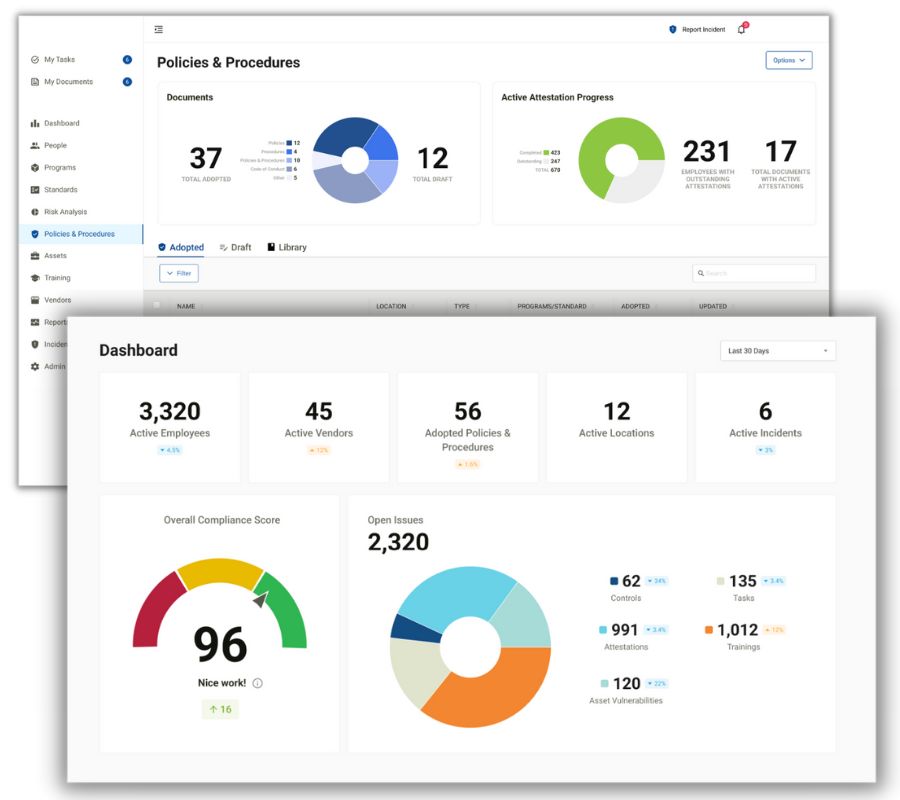
- Do dashboards demonstrate at a glance the overall compliance state of the organization, while also showing individual tasks, messages, and alerts like in our example below?
- How user-friendly are the training modules that employees will be required to take as part of the organization’s compliance?
2. Customization
- Are workspaces customizable?
- Are documents such as policies customizable?
- Are reports customizable?
3. Scalability & Flexibility
- Can the software accommodate your organization’s current scale, for example, to manage multiple locations?
- Can it scale up and adapt to your organization’s evolving future needs?
4. Integration Capabilities
- How will the software integrate with your existing IT infrastructure and the other third-party applications used within your organization?
- Cloud-based solutions are the easiest to implement, and have the advantage that ongoing infrastructure maintenance is the responsibility of the software vendor.
5. Future Proofing
- How will the software vendor address regulatory changes and updates to ensure ongoing compliance in a timely manner?
3. What Are The Business Considerations When Choosing Software?
Often when evaluating functionality and specifications, a favored vendor will quickly emerge. Nevertheless, it is recommended that you fully examine the commercial and business considerations before a final decision is made.
1. Vendor Reputation
- Is the software endorsed by any medical associations?
- Does the vendor have up-to-date case studies and testimonials from other similarly sized healthcare organizations that have successfully implemented the solution?
- It is always a good idea to speak directly with existing customers about their experiences with both the software and the vendor.
- It is better to speak to “random” customers than those provided by the vendor because it is highly unlikely they will provide a reference for an organization with a poor experience.
- If you have compliance department contacts across the healthcare industry consider reaching out to ask if anyone has direct experience with your favored vendor.
2. Vendor Training & Support
- Does the vendor offer live support throughout the initial implementation phase?
- What training is offered for your compliance team?
- After setup what ongoing support is offered? Is it 24 x 7?
3. Costs
- Look for a transparent breakdown of pricing structures, including initial setup costs, licensing fees, and any additional charges for support or updates.
- Is there a one-time purchase cost or is it a subscription-based model? Subscriptions have become the most common way to purchase cloud-based software.
- If fees are charged on a per-seat subscription basis then how will they change as the organization grows?
- If cost is an issue and it appears that the solutions on your shortlist are similar, ensure you create a price comparison table taking all factors into account, such as extra costs for training or support.
- You can also do the same comparison exercise based on growth scenarios. You don’t want to choose a cheaper solution now that turns into a far more expensive solution later on.
- Does the vendor offer discounts? For example, they may offer a group discount for an association you may already be a member of. It’s always worth asking as often this can be 15% or more off the list price annually.
4. Free Trial Or Money Back Guarantee
- A full demonstration may be enough to help you make your decision, but sometimes a short trial period can be helpful if you have any doubts. It also allows you to ask your colleagues to take a look at their convenience before a final decision is made.
- Not all software is suitable for a free trial because of the effort required for the setup by both the vendor and the healthcare organization. In this scenario, you could ask for a guarantee that if you are not satisfied you have the option to back out of the agreement within a certain period.
5. Software Licence Period
- What is the commitment period you are signing up for? Is it month-by-month or year-by-year? Is there a minimum period such as three or five years? Read the small print on any agreement before you send it to your legal department.
- The advantage of shorter periods is that the onus is on the software vendor to ensure you are kept happy because they won’t want you to cancel. Alternatively, if you are willing to sign up for a longer period then you may be able to negotiate a lower annual cost.
 Free Buyer’s Guide
We have compiled a free buyer’s guide to choosing the best healthcare regulatory compliance software. This includes a checklist for the three aspects discussed in this article where you can rate up to three different solutions and compare your results. This guide to choosing healthcare compliance software can be downloaded by filling in the form on this page.
The post Building a Stronger Compliance Program With Software appeared first on The HIPAA Journal.
Why HIPAA Compliance Software Is Perfect For Small Medical Practices
For most small medical practices HIPAA compliance software is a very helpful and inexpensive tool that makes navigating the complexities of HIPAA simple, while also fostering peace of mind through a comprehensive risk management processes.
 At smaller organizations with under 100 employees, responsibility for HIPAA compliance normally falls to an administrator or practice manager who usually won’t have deep knowledge of compliance matters. For these multitasking individuals, HIPAA compliance software reduces the administrative burden and lessens the likelihood of an expensive HIPAA breach.
What Are The Benefits Of HIPAA Compliance Software?
The benefits of using HIPAA compliance software for an administrator or practice manager are as follows:
- Reduced Administrative Burden: HIPAA compliance software automates many administrative tasks related to compliance management, such as tracking training requirements, managing documentation, and scheduling audits. This frees up time and reduces the administrative burden.
- Effective Risk Management: HIPAA compliance solutions provide tools for conducting risk assessments, identifying vulnerabilities, and implementing risk mitigation strategies.
- Confidence In Role: The best HIPAA compliance software offers built-in guidance, templates, and best practices to support compliance efforts. This helps the compliance officer feel more confident in their ability to fulfil their responsibilities, even without specialized training or expertise in compliance matters.
- Reduced Stress: By using HIPAA compliance tracking software, individuals can feel reassured that they are taking all necessary steps to protect patient information and maintain compliance with HIPAA. This peace of mind reduces the stress and uncertainty associated with compliance management.
What To Consider When Purchasing HIPAA Compliance Software?
By following our buyer’s guide framework, you can make a thorough assessment of the best HIPAA compliance software options and select the most suitable solution to support your organization’s requirements. There are three aspects to consider when purchasing HIPAA compliance software which are discussed in detail below:
1. Essential Functionality
2. Software Specifications
3. Business Considerations
1. What Essential Functionality Is Required For HIPAA Compliance Software?
The best HIPAA compliance software should be a flexible system that follows a recognized framework like the HHS’s Seven Fundamental Elements Of An Effective Compliance Program. It should offer both a prebuilt approach and customizable options.
The solution needs to ultimately provide proof of compliance for patients, clients, and auditors, and ideally offer a certification process for this.
For compliance officers with little experience, the initial setup of the software is key. The best HIPAA compliance solutions offer some form of live compliance coaching to guide you through each step of setting up your HIPAA compliance program.
The following essential functionality will allow you to confidently address your organization’s compliance requirements:
1. Risk Assessment
- Risk assessment tools
- Risk scoring
- Gap identification
- Remediation planning
- Evidence tracking (for inspections)
- Guidance wizards to help set-up and identify action plan
2. Incident Response
- Anonymous incident reporting for employees
- Breach incident reporting
- Breach management tools
3. Policies & Procedures
- Templated and customizable policies and procedures
- Policy and procedure management
- Central storage of policies and procedures
- Employee attestation management
- Employee portal for easy access to review policies
4. Employee Training
- Train, track, and manage HIPAA compliance training for employees
- Up-to-date HIPAA compliance training modules
- Personalized, individual employee training certificates
- Training beyond HIPAA covering other HR needs such as OSHA and Fraud Waste & Abuse
5. Vendor/ Business Associate Management
- Identify and track business associates
- Customizable business associate agreement templates
- Store and track business associate agreements
- Vendor due diligence and risk scoring
- Contract management and vendor exclusion screening
6. Multi-Site Management
- Manage the compliance levels at each site in an organization separately
7. Reporting
- Customizable reporting templates including reports to demonstrate compliance to stakeholders or regulators
- Centralized documentation storage
- Audit logging and reports
8. Employee Screening (not essential)
- Ability to check the HHS OIG Exclusions list
- Sanction screening
- Employee conformance scoring
- HRIS integrations
 What other features should you consider for your HIPAA compliance solution?
- Consider if you also need OSHA (Dental or Medical) and SOC 2 compliance, and if so, ensure your chosen software can provide this as an all-in-one healthcare compliance solution.
- Does the software allow you to customize your own compliance standards?
2. What Are The Software Specifications To Consider For HIPAA Compliance Solutions?
Software specifications are aspects of a solution, such as usability or scalability, that are not about specific functionality but describe the broader qualities of the software. Specifications will help inform your decision when comparing HIPAA compliance software solutions.
1. Ease Of Use
- Assess the software’s overall user experience, including the user interface and navigation around the solution.
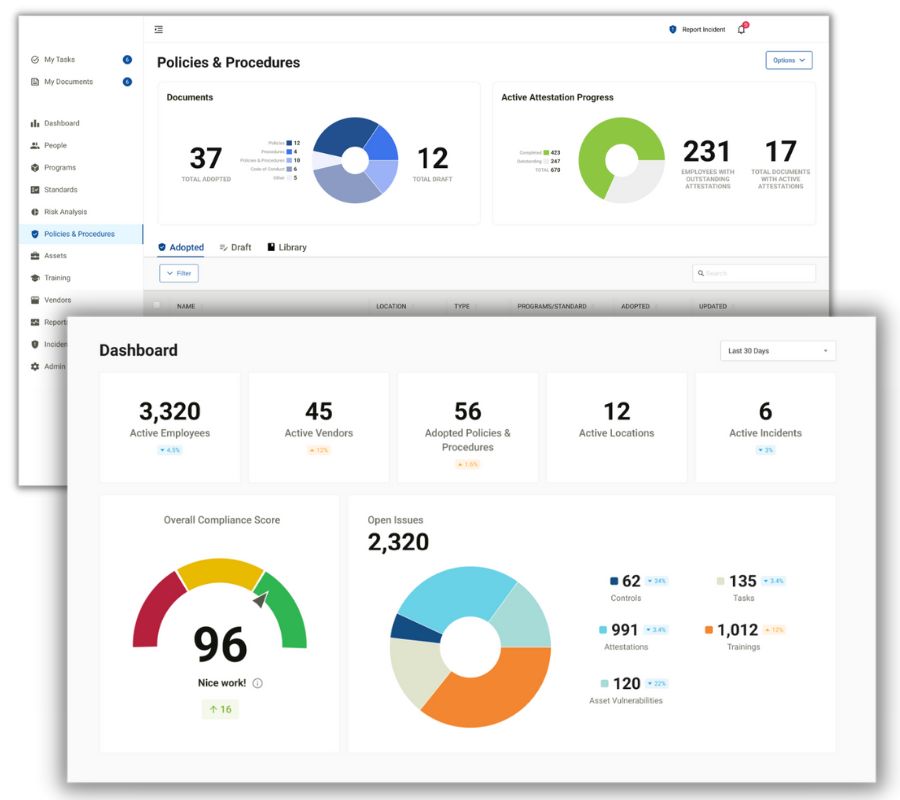
- Does it have an intuitive interface that includes guided workflows for conducting compliance activities? This is vital to make it easier for individuals without deep compliance expertise to navigate the compliance process.
- How user-friendly are the training modules that employees will be required to take as part of the organization’s compliance?
2. Scalability & Flexibility
- Can the software accommodate your organization’s current scale, for example, to manage multiple locations?
- Can it scale up and adapt to your organization’s evolving future needs?
3. Integration Capabilities
- How will the software integrate with your existing IT infrastructure and the other third-party applications used within your organization?
- Cloud-based solutions are the easiest to implement, and have the advantage that ongoing infrastructure maintenance is the responsibility of the software vendor.
4. Future Proofing
- How will the software vendor address regulatory changes and updates to ensure ongoing compliance in a timely manner?
3. What Are The Business Considerations When Choosing Software?
You may find that when evaluating functionality and specifications, a favored vendor will emerge and you feel ready to award them the business right away. It is highly recommended that you don’t allow yourself to be pressured into a fast decision before fully examining the commercial and business considerations.
1. Vendor Reputation
- Is the software endorsed by any medical associations?
- Do they have current case studies and testimonials from other healthcare organizations that have successfully implemented the software?
- It is always a good idea to request references i.e. to directly speak with existing customers about their experiences with both the software and the vendor.
2. Vendor Training & Support
- Does the vendor offer live support to guide you through the setup of their HIPAA compliance software solution?
- Is there a separate cost for this, or is it included in the price?
- After setup what ongoing support is offered and it is this included in the vendor’s annual charges?
3. Costs
- Look for a transparent breakdown of pricing structures, including initial setup costs, licensing fees, and any additional charges for support or updates.
- Is there a one-time purchase cost or is it a subscription-based model? Subscriptions have become the most common way to purchase cloud-based software.
- If cost is an issue and it appears that the solutions on your shortlist are similar, ensure you create a price comparison table taking all factors into account, such as extra costs for training or support. For example, whether HIPAA training is included or not.
- Does the vendor offer discounts? For example, they may offer a group discount for an association you may already be a member of. It’s always worth asking as often this can be 15% or more off the list price annually.
4. Free Trial Or Money Back Guarantee
- A full demonstration may be enough to help you make your decision, but sometimes a short trial period can be helpful if you have any doubts. It also allows you to ask your colleagues to take a look before a final decision is made.
- Not all software is suitable for a free trial because of the effort required for the setup by both the vendor and the customer. In this scenario, you could ask for a guarantee that if you are not satisfied you have the option to back out of the agreement within a certain timeframe, like 30 days.
5. Software License Period
- What is the commitment period you are signing up for? Is it month-by-month or year-by-year? Is there a minimum period such as three or five years? Read the small print on any agreement.
- The advantage of shorter periods is that the onus is on the software vendor to ensure you are kept happy because they won’t want you to cancel. Alternatively, if you are willing to sign up for a longer period, or pay for a year in advance, then the annual costs may be reduced.
 Free Buyer’s Guide
We have compiled a free buyer’s guide to choosing HIPAA compliance software. This includes a checklist for the three aspects discussed in this article where you can rate up to three different solutions and compare your results.
This guide to choosing the best HIPAA compliance software can be downloaded by filling in the form on this page.
The post Why HIPAA Compliance Software Is Perfect For Small Medical Practices appeared first on The HIPAA Journal.
Insurance Firm Notifies 156K Victims – 1 Year After the Hack – BankInfoSecurity
Insurance Firm Notifies 156K Victims - 1 Year After the Hack BankInfoSecurity
Insurance Firm Notifies 156K Victims – 1 Year After the Hack – GovInfoSecurity
Insurance Firm Notifies 156K Victims - 1 Year After the Hack GovInfoSecurity
Chansky: Keeping confidentiality – AspenTimes.com
Chansky: Keeping confidentiality AspenTimes.com
Senators Demand Answers from UnitedHealth After Second Massive Data Breach in a Year – The HIPAA Journal
Senators Demand Answers from UnitedHealth After Second Massive Data Breach in a Year
Two U.S. senators have written to UnitedHealth Group (UHG) CEO Stephen J. Hemsley demanding answers about cybersecurity and the response to the massive data breach at its subsidiary, Episource, which exposed the personal and protected health information of 5.4 million individuals earlier this year.
Episource, which was acquired by UHG-owned Optum in 2023, provides medical coding and risk adjustment services to physicians, health plans, and other healthcare companies. In June 2025, the company announced a hacking incident that involved unauthorized access to its network between January 27, 2025, and February 6, 2025. The hackers stole sensitive information such as names, dates of birth, Social Security numbers, health information, health insurance information, and Medicare/Medicaid numbers.
The hacking incident at Episource occurred within a year of a ransomware attack on another UHG subsidiary, Change Healthcare, which resulted in the largest healthcare data breach in U.S. history. Change Healthcare has recently confirmed that 192.7 million individuals were affected and had their data stolen in the attack. The attack resulted in a prolonged outage that caused major disruption to electronic prescribing, claims submission, and payment transmission, resulting in a $14 billion payment backlog, which put healthcare providers across the country under significant financial strain. Former UHG CEO Andrew Witty was grilled by Senators about the Change Healthcare ransomware attack and confirmed that the attackers accessed Change Healthcare’s systems using compromised credentials for a Citrix portal that lacked multifactor authentication.
In the letter, Senator Bill Cassidy (R-LA), Chairman of the Senate Committee on Health, Education, Labor, and Pensions (HELP), and Senator Maggie Wood Hassan (D-NH) questioned UHG’s commitment to securing patients’ protected health information given the fact that two major cyberattacks have been experienced in just 12 months and the Change Healthcare cyberattack was the result of a lack of basic cybersecurity measures and a failure to upgrade legacy systems in the two years since UHG acquired Change Healthcare. The senators also criticized UHG for the aggressive approach being taken to recover the loans issued to healthcare providers who were unable to bill for their services due to the prolonged outage of Change Healthcare’s systems.
“We have seen the recent threat that hostile actors, including Iran, may pose on healthcare entities and UHG’s repeated failures to protect against such attacks jeopardizes patient health,” wrote the senators, who have demanded answers from UHG about its response to the Episource cyberattack and how it is improving its security processes company-wide following the Change HEalthcare cyberattack.
Regarding the Episource cyberattack, the senators want to know when the attack was first detected, when federal agencies were notified about the attack, the steps being taken to identify the information compromised in the incident, when UHG anticipates finalizing that process, and how UHG is proactively communicating with potentially impacted individuals and entities.
Given the hugely disruptive attack on Change Healthcare in February 2024, which was made possible due to security deficiencies, the senators want to know what remedial steps have been taken to improve security protocols, if those action have been completed and, if not, when they will be completed, and if UHG has made any changes to how it conducts due diligence on companies it plans to acquire to assess potential security risks. The senators require answers to their questions by August 18, 2025.
The post Senators Demand Answers from UnitedHealth After Second Massive Data Breach in a Year appeared first on The HIPAA Journal.
Alera Group Notifies 155K Individuals About July 2024 Hacking Incident – The HIPAA Journal
Alera Group Notifies 155K Individuals About July 2024 Hacking Incident The HIPAA Journal